The MikroTik MTCNA — Certified Network Associate is the official entry-level MikroTik certification — a three-day training course for network engineers and technicians deploying and managing corporate networks, WISP and ISP client CPEs. The MTCNA course covers the RouterOS platform and RouterBOARD hardware in full — from initial configuration and static routing to firewall, QoS, tunnels and wireless — providing the foundation required for all advanced MikroTik certifications.
Course agenda covers the following modules:
Module 1 — Introduction to RouterOS: you will access and configure a MikroTik router for the first time via WinBox, WebFig and CLI, perform initial setup with Internet access, manage backups, RouterOS licenses, services and reinstall the system using Netinstall — the essential foundation for any MikroTik network administrator.
Module 2 — DHCP and ARP: you will configure DHCP server and client, manage leases and DHCP networks, and understand ARP modes and the ARP table in RouterOS — core services for any MikroTik-managed local network.
Module 3 — Bridging: you will create bridges, add ports and configure wireless bridging including Station Bridge mode — Layer 2 solutions for interconnecting network segments across wired and wireless interfaces.
Module 4 — Routing: you will implement static routing, configure default routes and manage dynamic routes — fundamental concepts for inter-network connectivity in simple and medium RouterOS infrastructures.
Module 5 — Wireless: you will configure simple wireless links using 802.11 a/b/g/n/ac standards, set up Access Point and Station modes, implement WPA2-PSK security with Access List and Connect List, and use monitoring tools including Snooper and the registration table.
Module 6 — Firewall: you will implement filtering on input and forward chains, connection tracking, Address List, Source NAT with masquerade and Destination NAT — baseline protection for the router and client traffic in RouterOS networks.
Module 7 — QoS: you will configure Simple Queue with target, limit-at, max-limit and burst, and implement PCQ for fair bandwidth management across the entire network — traffic control for multi-user environments.
Module 8 — Tunnels: you will configure PPP with profiles and secrets, IP Pool, PPPoE client and server, and secure PPTP and SSTP tunnels — solutions for secure remote network connectivity and VPN client access.
Module 9 — RouterOS Tools: you will use RouterOS monitoring and diagnostic tools — Ping, Traceroute, Torch, Graphs, SNMP, Netwatch, E-mail and The Dude — and manage system logs and support files for effective infrastructure troubleshooting.
Entry requirements: No certification prerequisite — the MTCNA course is open to any technician or engineer with a solid understanding of TCP/IP and subnetting. Duration: 3 days, intensive format with hands-on lab sessions included in every module.
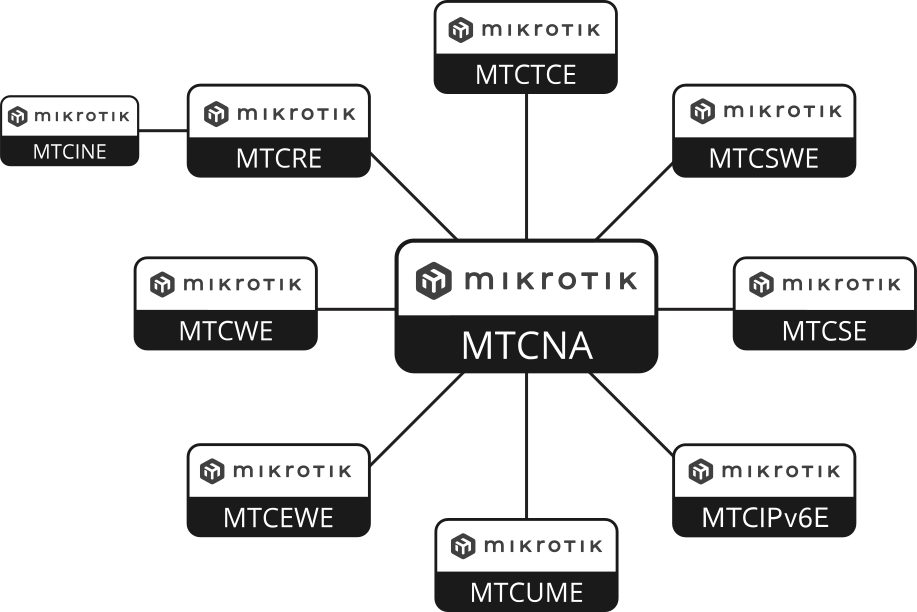
Upon completion, participants receive the official MikroTik MTCNA certification — the mandatory prerequisite for all advanced MikroTik certifications (MTCWE, MTCTCE, MTCUME, MTCRE, MTCINE, MTCIPv6E) — and the practical ability to configure, manage and troubleshoot MikroTik routers in real-world networks. Ideal for entry-level network administrators, ISP and WISP technicians, and any IT professional integrating MikroTik equipment into their infrastructure.
No questions about this product, be the first and ask your question.